
Share a guest link. Friends can view in the browser.
Split dinners and group bills with friends. Assign items or split evenly. Friends can view the shared project in their browser via a guest link (read-only). You settle money outside the app.
Free forever for core. Optional AI scans: 50 free to start. Friends can view what they owe through a guest link — no app needed to look.

One receipt scan, clear splitting, easy settle up.
Scan or add a receipt, check its items, and assign them to people — including guests. Add friends as guests and share a project link. They can view items, balances and settlement status in their browser without installing the app or signing in. The shared view is read-only; the organiser manages the split in the app. Pay outside SplitSlip and follow the settlement status.
Add the bill by hand or scan the receipt, assign items or split evenly, and let SplitSlip show who owes what. Friends can view a guest link in the browser (read-only). You settle money outside the app.
Type the items in for free, or snap a photo. AI scans are optional: 50 free to start, then scan packs.
Add friends as guests and share a project link. They can view items, balances and settlement status in their browser without installing the app or signing in. The shared view is read-only; the organiser manages the split in the app.
Even split for simple cases, custom shares when it’s not equal.
See what everyone owes and who paid. You settle money outside the app.
Settle proof
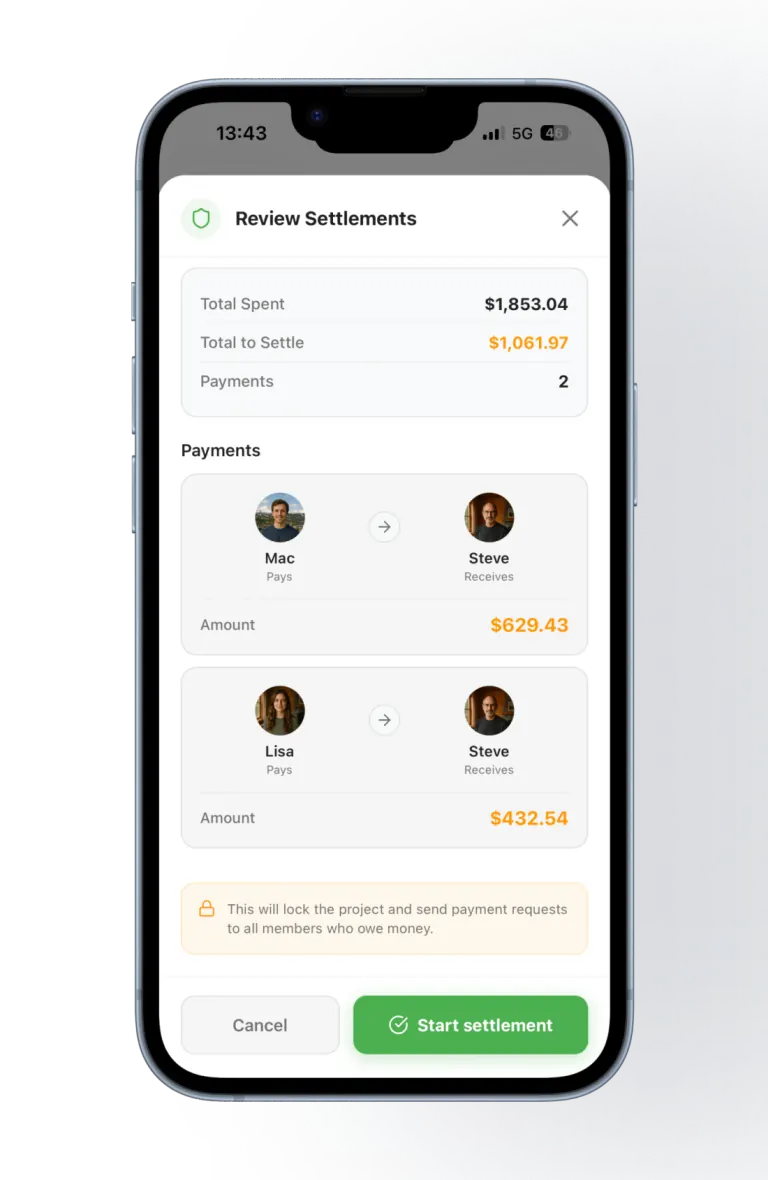
Once the group's spending is in, SplitSlip works out the fewest payments needed to settle up — here Mac and Lisa each owe Steve, with the exact amount for each.
SplitSlip shows what everyone owes and who paid. You settle money outside the app — SplitSlip is not a Vipps, card, or bank payment rail.
Splitting expenses with friends sounds easy—until it isn’t. A weekend trip turns into 30 small purchases: groceries, restaurants, taxis, tickets, snacks, parking, and “I’ll get this one” moments. Without a system, it’s almost guaranteed someone ends up paying too much, someone forgets what they owe, and the group chat gets awkward.
Add each purchase as you go. Type it in by hand — that stays free — or scan the receipt. With SplitSlip, the group is selected and the split is applied, so you can see who owes what. You settle the money outside the app.
SplitSlip is made for real-world group spending. Here are a few common scenarios where it saves the most time:
When everyone orders something different, dividing the total by headcount is not always fair. SplitSlip lets the organiser assign each line on the bill.
If you are comparing itemized dinners with Splitwise, see the Splitwise alternative page. SplitSlip is independent and is not affiliated with Splitwise.
Many people search “split expenses with friends” because they want it to be fair. Fair doesn’t always mean equal. SplitSlip supports both:
After you’ve added receipts and splits, SplitSlip shows what everyone owes and who paid. You settle money outside the app. SplitSlip is not a Vipps, card, or bank payment rail. The point is clarity: everyone looking at the project sees the same numbers and the same receipts.
Related: Home, receipt scanner, Splitwise alternative, Rewards.
Add the bill by hand, or scan the receipt if you want. Assign each dish or drink to the person who had it. A shared item, such as an appetizer, can be split across the people who had it. Split the whole bill evenly only when everyone shared it the same way. Typing the items in stays free. Friends can open a guest link in the browser, and that link is view-only. To join and edit, they install SplitSlip and sign in. You settle the money outside the app.
No. Split by item when orders differ. Split evenly when everyone shared the bill the same way.
Add tax or tip with the bill if the group is dividing them, then assign those amounts the same way as the dishes. SplitSlip does not send the tip or take the card payment.
The person who paid the restaurant stays the payer in the project. SplitSlip records that. It does not charge the card. Friends see what they owe, then pay each other outside the app.
Add the expense by hand or scan the receipt, assign items or split evenly, and SplitSlip shows who owes what. Friends can view a guest link in the browser. You settle money outside the app.
Yes. Assign a line to one person, split a shared item across the people who had it, or split evenly when everyone shared it the same way.
Yes. Create a project for the trip and add restaurant bills, groceries, and activities as you go. Manual entry, splits, and sharing the project stay free.
No. SplitSlip keeps the receipts and the splits in the project and shows who owes what. You still settle the money outside the app.
A guest link is view-only in the browser. Friends can see items, balances, and who owes whom without installing or signing in. To join the project or edit it, they install SplitSlip and sign in. You organise the split in the app.
SplitSlip is a shared ledger: it shows what everyone owes and who paid. You settle the money outside the app. SplitSlip is not a bank, and it is not a Vipps or card payment rail.
Scan receipts, split costs fairly, track group spending, and settle up without stress.