
Share a guest link. Friends can view in the browser.
Scan a receipt into line items, assign who had what, and split fairly. Optional AI scanning includes 50 free scans to start. Manual entry is always free.
Free forever for core. Optional AI receipt scanning: 50 free scans to start, then packs. Guests can view the shared project via a guest link (read-only). You settle money outside the app.

Scan the receipt. Assign items. Settle outside the app.
Scan or add a receipt, check its items, and assign them to people — including guests. Add friends as guests and share a project link. Guests can view a shared link without an account: items, balances, and who owes whom, right in the browser, with no install needed. The shared view is read-only; the organiser manages the split in the app. You settle money outside the app.
Many receipt scanner apps focus on bookkeeping. SplitSlip focuses on real life: shared spending with real people. You scan the receipt, assign line items to people, and see who owes what.
Optional AI reads the receipt into line items so you can assign who had what.
Even splits or custom shares per person (great for shared items).
See totals per project or family and keep everyone aligned.
See what everyone owes and who paid. You settle money outside the app.
Assign proof
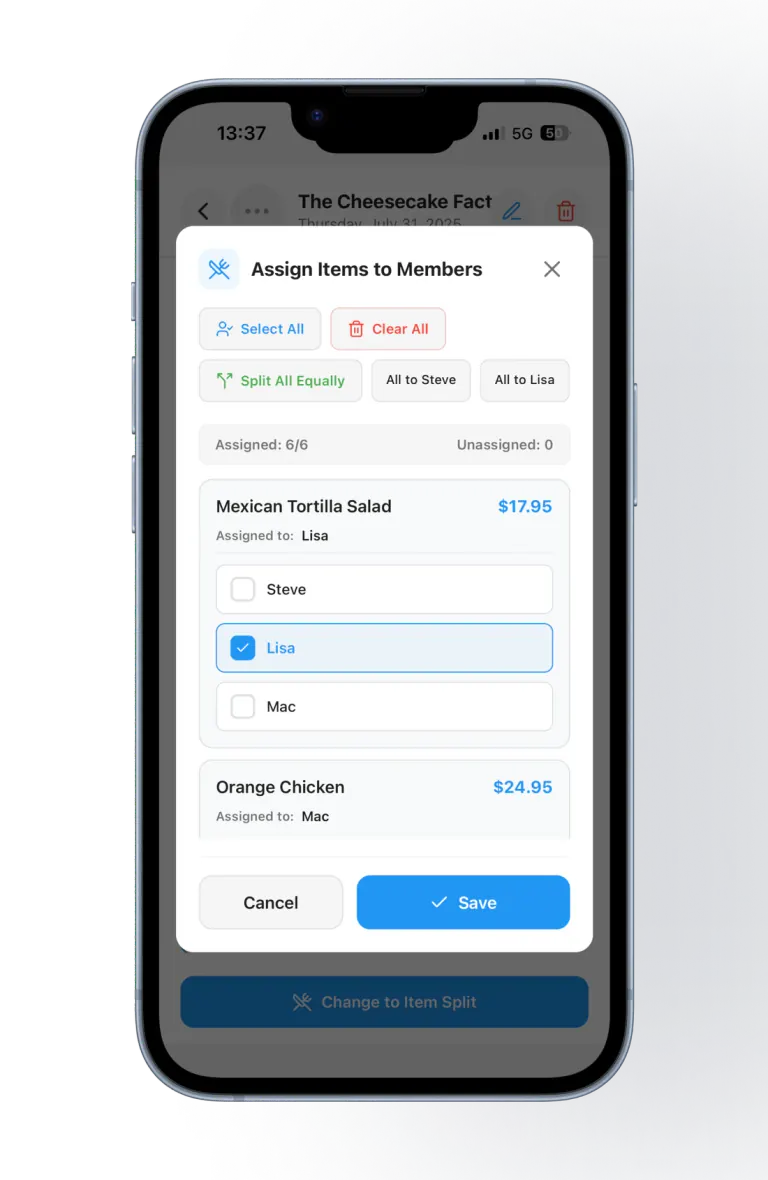
A real Cheesecake Factory dinner: scan the slip, then assign items — not just 50/50. Shared items can be split. Everyone in the group sees the same balances.
AI scans are optional. You get 50 free scans to start, then scan packs in the App Store and Google Play. Manual entry stays free.
If you’ve ever tried to split a restaurant bill or manage vacation spending, you know the pain: someone pays, someone forgets, someone guesses the split, and the group chat turns into a mini accounting firm. A normal receipt scanner can save a receipt, but it won’t actually solve the “who owes what” problem.
SplitSlip is a receipt scanner app designed specifically for splitting expenses. The flow is simple: scan the receipt (or add it by hand), assign items to people, and see who owes what. Friends can view the shared project in their browser via a guest link (read-only). You settle money outside the app.
Searching for “receipt scanner” often brings you to tools built for bookkeeping. That’s fine if you’re running a business, but most people just want to split a receipt with friends. SplitSlip adds the missing layer: splitting logic and a clear settlement view. That’s why people also find SplitSlip through searches like “scan receipt and split”, “split bills with friends”, and “group expense tracker”.
With SplitSlip, you can create projects for trips or households, keep receipts in one place, and see a clean overview of balances. Instead of hunting through photos in your camera roll, everything stays organized and shareable.
Core tracking and splits stay free forever. Optional AI scans include 50 free to start, then scan packs in the App Store and Google Play. Add friends as guests and share a read-only project link: guests can view a shared link without an account, in the browser, with no app needed. You settle money outside the app.
Looking for a Splitwise-style comparison? Compare SplitSlip and Splitwise. See also split expenses with friends and Rewards. Ready to try it? Download SplitSlip free and scan your first receipt in the app.
Open SplitSlip on iPhone or Android and snap the paper slip. Optional AI reads the receipt into line items so you can assign who had what. Check the items and amounts before you assign them. You can also type the bill in by hand, and manual entry stays free.
Keep your own receipts in one place. SplitSlip lets you save and search by store, date and items, including a search by store or product. That is for finding a receipt you already saved. SplitSlip is not an accounting, VAT or warranty tool.
For a restaurant example, see how to split a restaurant bill by item.
Yes. SplitSlip scans receipts and turns them into shareable expense entries so you can split costs with friends and family.
Yes. Assign each line to the person who had it, or split a shared item across the people who had it. Use an even split when everyone shared the receipt the same way.
Yes. Once the receipt is in the project, assign each dish or drink to the person who had it. A shared item can be split across the people who had it. Friends view a guest link in the browser, and that link is view-only. To join and edit, they install SplitSlip and sign in. You settle money outside the app.
Add friends as guests and share a project link. Guests can view a shared link without an account: items, balances, and who owes whom, right in the browser, with no install needed. The shared view is read-only; the organiser manages the split in the app. You settle money outside the app — SplitSlip is not a Vipps, card, or bank payment rail.
Group spending: restaurant bills, trips, friends, couples, families, and shared events—any time you want to assign items and split the receipt.
SplitSlip is designed to help you manage shared expenses. Read the Privacy Policy for details on how data is handled and your rights.
Try SplitSlip for your next dinner, trip, or shared purchase. One receipt scan, clear splitting, and a clean overview.