
Share a guest link. Friends can view in the browser.
Split dinners and group bills with friends. Assign items or split evenly. Friends can view the shared project in their browser via a guest link (read-only). You settle money outside the app.
Free forever for core. Optional AI scans: 50 free to start. Friends can view what they owe through a guest link — no app needed to look.

One receipt scan, clear splitting, easy settle up.
Scan or add a receipt, check its items, and assign them to people — including guests. Add friends as guests and share a project link. Guests can view a shared link without an account: items, balances and settlement status, right in the browser, with no install needed. The shared view is read-only; the organiser manages the split in the app. Pay outside SplitSlip and follow the settlement status.
Add the bill by hand or scan the receipt, assign items or split evenly, and let SplitSlip show who owes what. Friends can view a guest link in the browser (read-only). You settle money outside the app.
Type the items in for free, or snap a photo. AI scans are optional: 50 free to start, then scan packs.
Add friends as guests and share a project link. Guests can view a shared link without an account: items, balances and settlement status, right in the browser, with no install needed. The shared view is read-only; the organiser manages the split in the app.
Even split for simple cases, custom shares when it’s not equal.
See what everyone owes and who paid. You settle money outside the app.
Settle proof
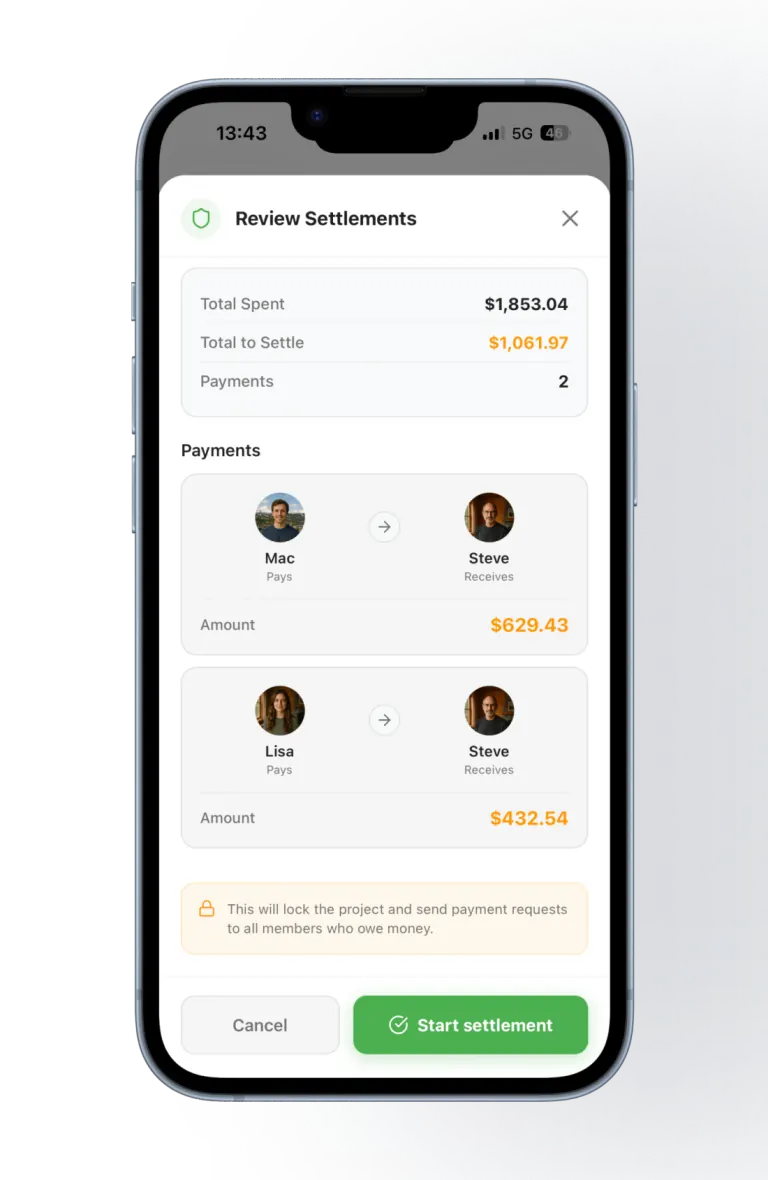
Once the group's spending is in, SplitSlip works out the fewest payments needed to settle up — here Mac and Lisa each owe Steve, with the exact amount for each.
SplitSlip shows what everyone owes and who paid. You settle money outside the app — SplitSlip is not a Vipps, card, or bank payment rail.
Splitting expenses with friends sounds easy—until it isn’t. A weekend trip turns into 30 small purchases: groceries, restaurants, taxis, tickets, snacks, parking, and “I’ll get this one” moments. Without a system, it’s almost guaranteed someone ends up paying too much, someone forgets what they owe, and the group chat gets awkward.
Add each purchase as you go. Type it in by hand — that stays free — or scan the receipt. With SplitSlip, the group is selected and the split is applied, so you can see who owes what. You settle the money outside the app.
SplitSlip is made for real-world group spending. Here are a few common scenarios where it saves the most time:
When orders differ, split the bill by item instead of by headcount: give each dish or drink to the person who had it, and split shared plates among the people who shared them. Tax is distributed proportionally to each person's items, so don't add tax or tip as extra items. For a full worked example, see how to split a restaurant bill by item.
Many people search “split expenses with friends” because they want it to be fair. Fair doesn’t always mean equal. SplitSlip supports both:
After you’ve added receipts and splits, SplitSlip shows what everyone owes and who paid. You settle money outside the app. SplitSlip is not a Vipps, card, or bank payment rail. The point is clarity: everyone looking at the project sees the same numbers and the same receipts.
Related: Home, receipt scanner, Splitwise alternative, Rewards.
Assign each dish or drink to the person who had it, and split shared items among the people who had them. Tax is distributed proportionally to each person's items, so don't add tax or tip as extra items. Our guide to splitting a restaurant bill by item has a full worked example.
Add the expense by hand or scan the receipt, assign items or split evenly, and SplitSlip shows who owes what. Friends can view a guest link in the browser. You settle money outside the app.
Yes. Assign a line to one person, split a shared item across the people who had it, or split evenly when everyone shared it the same way.
Yes. Create a project for the trip and add restaurant bills, groceries, and activities as you go. Manual entry, splits, and sharing the project stay free.
No. SplitSlip keeps the receipts and the splits in the project and shows who owes what. You still settle the money outside the app.
A guest link is view-only in the browser. Guests can view a shared link without an account and see items, balances, and who owes whom without installing the app. To join the project or edit it, they install SplitSlip and sign in. You organise the split in the app.
SplitSlip is a shared ledger: it shows what everyone owes and who paid. You settle the money outside the app. SplitSlip is not a bank, and it is not a Vipps or card payment rail.
Scan receipts, split costs fairly, track group spending, and settle up without stress.